Plan-Based Feature Limits
Your plan determines which features are available in your workspace and how much capacity you have. Here is a detailed breakdown of what is gated by plan.
CRM integration
Starter: Read-only CRM access. You can view CRM data but not write back to it.
Pro: Full read/write CRM with one connection (HubSpot or Salesforce).
Enterprise: Unlimited CRM connections with full read/write access.
Embeddable forms
Starter: 1 form.
Pro: Up to 5 forms.
Enterprise: Unlimited forms.
Custom branding
Starter: Not available.
Pro and Enterprise: Upload your logo, set an accent color, and choose a design theme.
AI Assistant
Starter: Managed AI only (SampleHQ-provided).
Pro and Enterprise: Managed AI plus BYOK (Bring Your Own Key) to connect your own AI provider.
API access
Enterprise only. Direct API access for custom integrations.
Usage meters
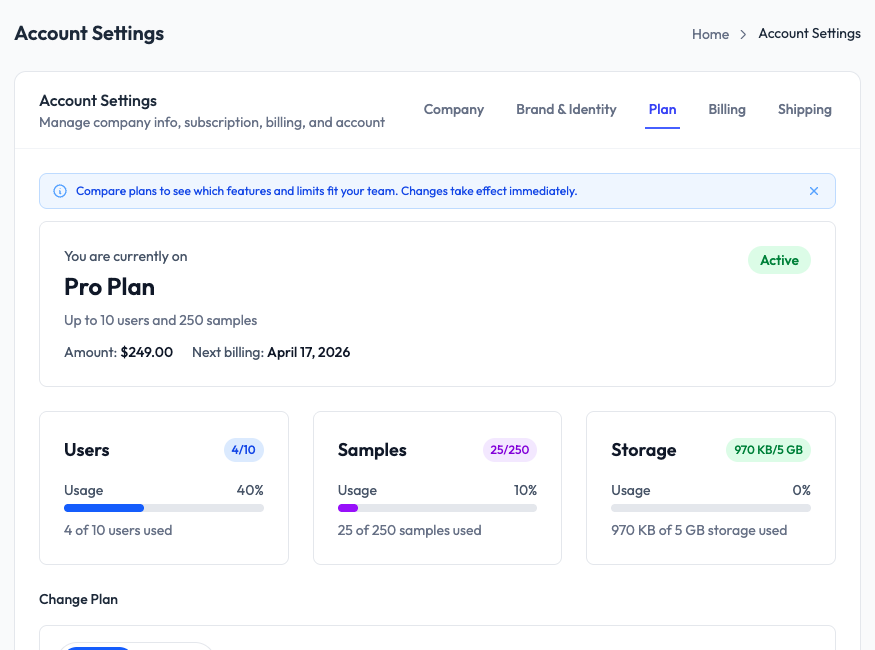
Your Plan tab in Account Settings shows live usage for users, samples, and storage. Each meter shows how much of your plan limit you have used. If you approach a limit, SampleHQ sends a notification so you can upgrade before hitting a cap.