Managing Your Subscription
Updated Apr 4, 2026
Account and Billing
Your subscription details are managed in Account Settings. Only account owners can view and change subscription settings.
Finding your subscription info
- Click Workspace Settings in the sidebar.
- Go to Account Settings.
- Open the Plan tab.
Here you will see your current plan name, monthly amount, next billing date, and usage meters for users, samples, and storage.
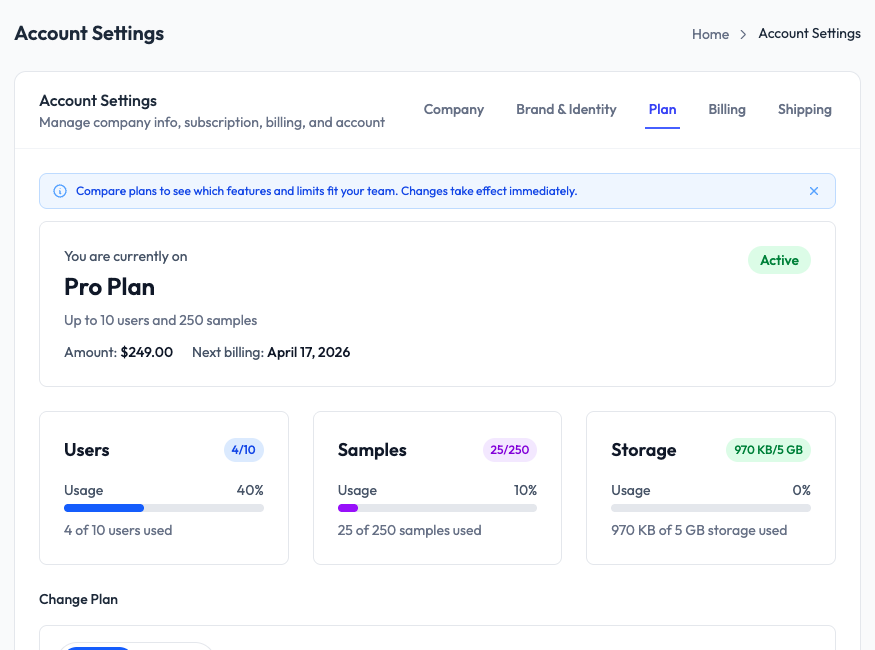
What you can do from this page
- View your current plan and its limits
- See how much of each limit you have used (users, samples, storage)
- Change your plan (upgrade or downgrade)
- View your next billing date and amount
Billing tab
Switch to the Billing tab to view your invoice history and download past invoices. To update your payment method or manage your subscription directly, use the links on the Plan tab.