Linking Deals from HubSpot
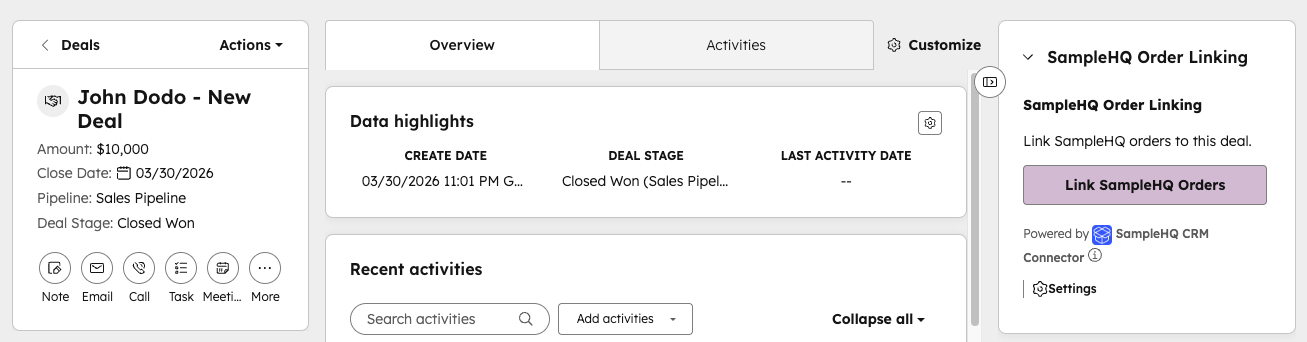
If your workspace is connected to HubSpot, you can link sample orders to deals directly from within HubSpot using the SampleHQ card on the deal record page.
Where to find it
Open any deal record in HubSpot. A SampleHQ card is displayed on the deal record page. This card provides direct access to the picker tool for linking sample orders.
How it works
- Open the HubSpot deal you want to link.
- Find the SampleHQ card on the deal record page.
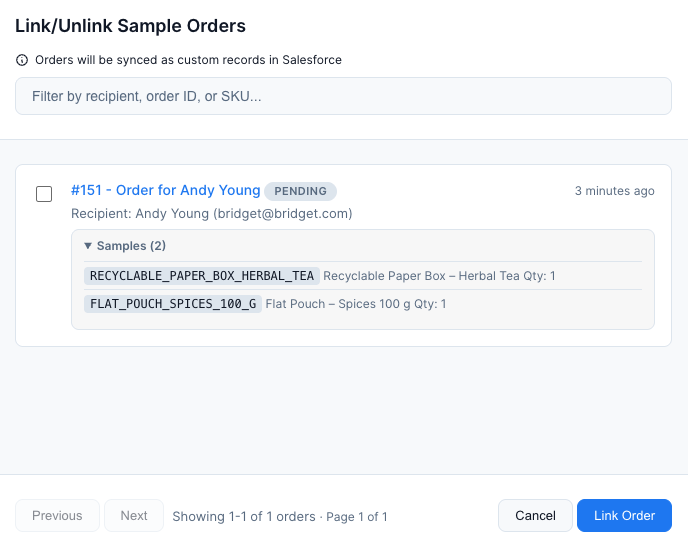
- Click the card to open the deal picker tool.
- Search for the sample order you want to link, or browse the list.
- Click Link to associate the sample order with this deal.
Unlinking
Use the same SampleHQ card to unlink a sample order from a deal if it was linked by mistake.
Matching requirement
You can only link a sample order to a deal if they share at least one contact or company/account in common. SampleHQ uses this overlap to ensure links are meaningful and to power the suggested deals feature.
Requirements
This feature requires an active HubSpot connection in SampleHQ. The SampleHQ card appears automatically on deal records after the connection is set up.