Deal Attribution Reports
Updated Apr 4, 2026
Attribution and Reporting
The Deals report shows attribution from the deal perspective: which samples were sent for each deal and how much revenue was influenced.
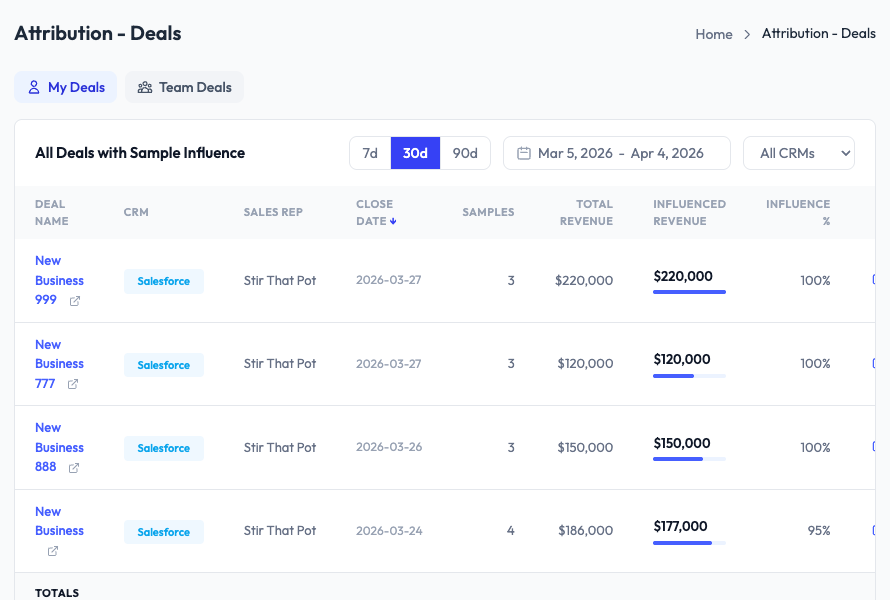
Columns
- Deal Name – The CRM deal name (clickable for detail)
- CRM – Which CRM the deal comes from (Salesforce or HubSpot)
- Sales Rep – Who owns the deal
- Close Date – When the deal was closed
- Samples – Number of samples linked to this deal
- Total Revenue – The deal’s total value
- Influenced Revenue – The portion attributed to samples
- Influence % – The ratio of influenced to total revenue
My Deals vs Team Deals
Toggle between My Deals (deals you own) and Team Deals (all deals across the team) using the tabs at the top.
Deal detail view
Click a deal name to see the full breakdown: every sample order linked to this deal, the individual samples sent, and the dollar values assigned to each.